A medical touch screen display needs to support the device’s intended users and operating conditions throughout its service life. A bright image and responsive demonstration are useful, but they do not establish compatibility with repeated cleaning, clinical gloves, electrical interference, or years of controlled production.
For a portable device, those requirements compete with battery capacity, weight, enclosure thickness, and available processing power. The right display is therefore a documented system choice rather than a generic “medical grade” component.
This guide focuses on 3.5–8 inch touch displays for portable medical equipment and handheld instruments. It explains the questions OEM engineering and purchasing teams should resolve before design freeze. QIHAN is a manufacturer of small and medium industrial displays focused on 2.8–10.1 inch applications; suitability for a medical device must be established for the selected module and final equipment.
Why Portable Devices Need a Different Selection Process
A handheld instrument may move between a charging dock, a bedside, and a storage area several times a day. Users may hold it at an angle, wear gloves, or need to read it while managing another task. Home-use equipment can introduce different users and lighting conditions again.
These use cases are more informative than a general market growth forecast. A display chosen for a wall-powered interface may consume too much energy in a battery-powered product or leave too little usable screen space after protective framing is added.
Begin with the intended use, users, environment, and essential information the interface must communicate. Specify which failures are merely inconvenient and which could contribute to incorrect operation. That distinction guides testing and the wider device risk process.
What Does “Medical Grade Touchscreen” Mean?
Treat the phrase as an invitation to request evidence. By itself, it does not identify a universal display specification, a cleaning protocol, or approval of the complete medical device.
A useful supplier response connects each requirement to a defined configuration: panel and touch part numbers, cover materials, bonding construction, firmware revision, operating conditions, and relevant test records.
Keep component evidence separate from final device evidence. A supplier’s quality certification or controller feature may support selection, but it does not establish that the integrated equipment meets every applicable requirement.
Also distinguish a control display from a display used for diagnostic image interpretation. An ordinary small HMI module should not be assumed suitable for diagnostic viewing based on brightness or resolution alone.
Disinfectant Compatibility: Test the Whole Front Assembly
Identify the Actual Cleaning Process
A disinfectant-resistant touch screen must be compatible with the liquids and procedures specified for the device. “Alcohol resistant” is incomplete without concentration, contact time, application method, and repetition.
Collect the intended cleaner names and compositions where available. Record whether users wipe, spray onto a cloth, or follow another permitted procedure. Do not assume immersion or sterilization compatibility from a surface-wipe claim.
The FDA’s guidance on reprocessing reusable medical devices addresses validation of reprocessing instructions and their labeling. Material compatibility testing contributes useful evidence, but does not itself prove that a cleaning or disinfection process is effective.
Inspect More Than the Glass
The front surface may remain intact while an anti-fingerprint coating loses performance, printed markings fade, or an edge seal changes. Evaluate cover glass, coatings, decorative ink, adhesive, gaskets, and exposed plastics together.
Before and after testing, inspect haze, discoloration, cracking, edge lifting, and readability. Repeat touch tests, including edge controls. Where numerical optical limits matter, record measurements under a consistent method rather than relying only on photographs.
An illustrative usage calculation helps define exposure: five cleaning events per day over five years gives 9,125 events using 365 days per year. That is a planning count, not a validated accelerated test protocol. Concentration, wet contact time, drying, and mechanical abrasion still require appropriate consideration.
Glove Operation: Define Performance Instead of “Zero Delay”
Thin examination gloves may be easier to accommodate than thicker protective gloves, but material, fit, moisture, and double gloving can affect PCAP detection. Test the glove combinations relevant to the device’s intended use.
Specify required actions and response criteria. These may include selecting an item, entering a value, scrolling, or confirming a change. Record missed touches, unintended inputs, and the time between an action and visible feedback.
Avoid promising zero latency. Sensor scanning, communications, application processing, and display refresh all contribute to response. What matters is measured performance that supports the intended task.
The FDA human factors guidance emphasizes intended users, uses, and use environments. For the display project, that supports evaluating representative tasks with appropriate users rather than relying only on an engineer’s bench test.
Include behavior during cleaning. A cleaning lock should prevent unintended commands, make its state clear, and allow the user to resume normal operation through a defined process.
Readability in Portable Equipment
A handheld diagnostic device display may be viewed off-axis or under bright overhead lighting. Evaluate contrast, viewing angle, font size, glare, and the final protective lens as a complete assembly.
High brightness can help in some conditions, but it also affects power and heat. Optical bonding and anti-glare treatments are options to evaluate when reflections reduce usability. Confirm their effect on small text, color appearance, and cleaning compatibility before selecting them.
Use production-like screens during evaluation. Long messages, units, decimal points, low battery states, and alarm-related information deserve attention. The most attractive demonstration image may not expose readability problems in actual device use.
Brightness reduction should preserve essential information. Test both the maximum setting and the lowest permitted operating setting, including transitions from sleep. Do not rely on color alone where a label or symbol is needed to avoid ambiguity.
EMC: The Display Is Part of the Medical Device
Display clocks, backlight drivers, touch scanning, power converters, and cables can interact electrically with the host. A panel that behaves normally on one evaluation board may behave differently inside the final device.
IEC 60601-1-2 addresses electromagnetic disturbances in relation to medical electrical equipment and systems. The applicable edition, amendments, particular standards, and market requirements should be determined for the device. A display component does not acquire complete equipment compliance merely because it is intended for medical use.
The FDA’s medical device EMC guidance provides recommendations on testing and submission information. Use the device’s regulatory and test plan to define how display behavior will be observed during relevant evaluations.
For early engineering work, test with the intended charger, battery state, cable routing, shielding, and enclosure. Observe both image behavior and touch input. Document unwanted resets, frozen information, communication errors, and recovery behavior against your requirements.
Battery, Thickness, and Interface Trade-Offs
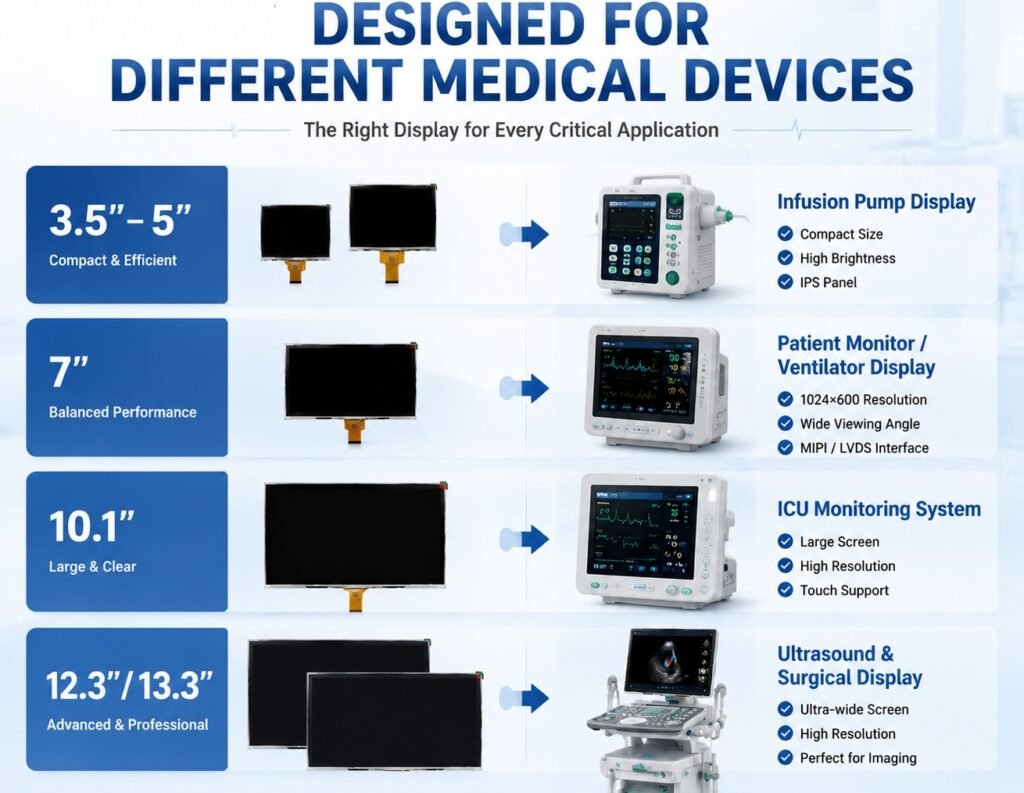
A 3.5 inch panel can support a compact handheld design, while 4.3 inch and 5 inch options provide more room for instructions. A 7 inch or 8 inch display may suit portable equipment with denser information, but needs a corresponding power and mechanical budget.
Ask for typical and maximum power under stated conditions. Include backlight settings, processor activity where applicable, touch operation, and sleep modes. Startup energy and repeated wake cycles may matter when the device is used intermittently.
Choose the video interface around the host architecture. RGB, MIPI DSI, LVDS, and HDMI require compatible hardware and can create different board, cabling, and power implications. USB or I2C touch should be specified separately.
If the project targets an IP65 front panel, define the rated boundary, installation, and test configuration. Front ingress protection does not establish cleaning chemistry compatibility or complete device protection. Keep these requirements separate in the verification plan.
Design-In Checklist for 3.5–8 Inch Modules
Use a requirements matrix to connect each purchasing decision to evidence.
| Requirement | Define before quotation | Evidence or deliverable |
|---|---|---|
| Optical performance | Resolution, contrast, brightness, viewing position | Module data and final-stack evaluation |
| Glove input | Glove types, layers, tasks, response limits | Test record for the proposed stack and firmware |
| Cleaning compatibility | Liquids, contact times, lifetime exposure | Material and assembly compatibility results |
| Environmental limits | Operation, storage, transport, humidity | Applicable ratings and test conditions |
| Power and packaging | Battery budget, thickness, cable clearance | Power data and dimensioned drawings |
| Electrical integration | Video, touch, grounding, charger conditions | Interface documentation and system test support |
| Production control | Traceability and approved revisions | Identification and change notification process |
| Supply continuity | Program duration and service demand | Written lifecycle and end-of-life terms |
For each report, confirm the tested sample matches the proposed construction. A result from a different coating or adhesive may not cover the chosen front assembly.
Lifecycle Commitment: Get the Terms in Writing
Medical equipment programs can require long support periods, so display availability deserves early commercial discussion. However, a request for ten years of supply is not evidence that a supplier has committed to it.
Ask how panel, touch controller, adhesive, and backlight changes are handled. Confirm the notice period, approval process, last-time-buy procedure, and responsibility for evaluating an alternative.
A useful lifecycle agreement also covers service demand after regular production ends. Forecast annual units, spare requirements, and acceptable inventory arrangements. Storing modules for years may introduce its own handling and qualification questions.
Maintain an approved configuration record that connects purchased parts to drawings, firmware, and test evidence. This makes a later change easier to assess than relying on a commercial family name that spans multiple revisions.
For migration economics, read PCAP vs Resistive Touch Screens: A Five-Year TCO Guide. Its approach includes qualification effort, which can be significant when an established medical device changes display technology.
Preguntas frecuentes
What makes a touch screen “medical grade”?
The useful answer is documented suitability for the intended device requirements. Request materials, cleaning compatibility, touch performance, environmental limits, traceability, and relevant evidence. The phrase alone does not establish a universal certification or approval of the medical equipment.
Can a capacitive screen withstand disinfectant wipes?
Some assemblies can tolerate specified wiping procedures, but compatibility depends on the cleaner, coating, adhesive, sealing materials, and exposure. Test the complete proposed stack against the device’s procedure. A successful short test should not be described as proof of unlimited lifetime resistance.
Do medical touch screens need special certifications?
Applicable requirements depend on the finished device, its intended use, and target market. Component documentation can support the process, but final equipment evaluation remains necessary. Have the device’s regulatory team identify the relevant standards and required evidence.
How long will my display module stay available?
Availability depends on written supplier terms and the underlying component supply chain. Request a program-specific commitment, change notifications, and an end-of-life plan. Do not interpret a broad claim of long lifecycle support as an unconditional ten-year guarantee.
Request Display Reliability Documentation From QIHAN
Send QIHAN your target size, host interface, cleaning protocol, glove requirements, expected volumes, and program duration. Ask which proposed configuration and available reliability records can support your evaluation. Where evidence is missing, agree on the testing scope before design approval.
For a deeper discussion of wet and gloved input, read Pantallas táctiles industriales para guantes: elegir PCAP para entornos húmedos.