
Modern data centers rely on remote management software, intelligent monitoring systems, and automated infrastructure. However, local display interfaces still play an important role in certain rack-mounted servers, network switches, routers, firewalls, and intelligent rack management devices.
A compact server LCD display can provide immediate access to management IP addresses, system health information, network status, and hardware alarm codes without requiring a separate monitor or external diagnostic computer.
For original equipment manufacturers (OEMs), selecting the right display involves more than choosing a suitable screen size. Mechanical constraints, interface compatibility, electromagnetic interference, power consumption, 24/7 reliability, and long-term component availability all influence the final design.
Small and medium-sized industrial LCD modules, typically ranging from 2.4 to 5.6 inches for these applications, offer flexible options for equipment manufacturers developing compact front-panel interfaces.
As an industrial LCD and TFT display manufacturer, QIHAN provides OEM/ODM customization services for display modules, including screen size, interface, flexible printed circuit (FPC), connectors, touch integration, and mechanical design.
This guide explains how to select reliable LCD modules for rack-mount servers and network equipment, with particular attention to hardware integration and long-term supply requirements.

1. Why Local LCD Displays Still Matter in Server and Network Equipment
Modern servers and networking devices are commonly managed through web-based interfaces, command-line tools, baseboard management controllers (BMCs), and centralized monitoring platforms.
Not all rack-mounted equipment requires an integrated LCD screen. Many devices rely entirely on status LEDs, management ports, and remote administration tools.
However, when a product requires a local human-machine interface (HMI), an LCD panel can provide useful operational advantages.
Immediate Access to System Information
A local LCD can display essential equipment information without requiring technicians to connect an external monitor.
Depending on the device architecture, this may include:
- Management IP address
- System operating status
- Hardware error codes
- Network connectivity
- Power supply condition
- Cooling fan information
- CPU and memory utilization
- System temperature
The available information depends on what the device’s management controller and firmware can provide.
Faster On-Site Troubleshooting
When network access is unavailable or remote management is temporarily inaccessible, a local display may help technicians identify basic equipment conditions.
For example, a maintenance engineer may use a front-panel LCD to check the management IP address or identify a hardware alarm.
This can reduce the need to connect separate diagnostic equipment for routine checks.
Simplified Local Configuration
Some network equipment designs incorporate physical buttons or touch interfaces for limited configuration functions.
These may include viewing network parameters, selecting menu options, identifying hardware modules, or confirming authorized settings.
For security-sensitive devices, local configuration access should be restricted through appropriate firmware and authentication mechanisms.
Compact Integration
Unlike full-size monitors, industrial LCD modules can be integrated into limited front-panel space.
For 1U, 2U, and 4U rack equipment, small LCD modules allow manufacturers to create practical maintenance interfaces without significantly changing the device architecture.
2. Where Are LCD Modules Used in Rack-Mounted Equipment?
Different server and network equipment categories have different display requirements.
Understanding the intended application helps manufacturers select an appropriate LCD technology, size, and interface.
2.1 LCD Front Panels for 1U, 2U and 4U Rack Servers
Rack-mounted servers are designed to maximize computing density while maintaining airflow and service accessibility.
Some server designs include optional or integrated front-panel LCDs for local monitoring.
Typical information includes:
- System identification
- Management network address
- Hardware health information
- Error messages
- Power status
- Maintenance menus
For compact servers, the LCD must fit around existing components such as drive bays, ventilation openings, power buttons, and status LEDs.
A small graphic or character LCD may be sufficient when the interface only displays status information and error codes.
More advanced graphical interfaces may require a color TFT LCD.
2.2 Network Switch LCD Display Modules
Network switches may include local display interfaces for diagnostics and configuration.
For example, a managed switch with a graphical front panel may display:
- Active network ports
- Link status
- Management IP information
- System temperature
- Power supply status
- Hardware alarms
For compact switches, a 2.4-inch or 3.5-inch LCD may provide sufficient display area for basic menus.
Larger interfaces may be useful for equipment with more complex monitoring requirements.
2.3 Router and Firewall Front-Panel Displays
Routers and network security appliances often require reliable status monitoring and controlled access to configuration information.
An LCD front panel can help operators identify system conditions and retrieve essential diagnostic information.
Potential display functions include:
- WAN/LAN connection status
- Management IP address
- Operating mode
- System uptime
- CPU utilization
- Security event indicators
- Hardware faults
Detailed logs and advanced security management normally remain within the device’s software management system rather than being presented entirely on a small LCD.
2.4 Intelligent Rack Monitoring and Power Management Equipment
Small industrial LCD modules are also suitable for related rack infrastructure.
Applications include:
- Intelligent power distribution units (PDUs)
- Rack environmental monitoring controllers
- Power management terminals
- Cooling system controllers
- Data center monitoring devices
These products may require simple graphical interfaces for voltage, current, temperature, humidity, or operating alarms.
For equipment manufacturers, custom LCD modules can help match the display to specific enclosure and controller requirements.

3. Choosing the Right LCD Size: 2.4″, 2.8″, 3.5″ or 5.6″?
Display size is one of the first decisions in server front-panel development.
However, the correct choice depends on more than screen diagonal measurements.
Manufacturers must evaluate the active display area, module outline, viewing distance, resolution, connector arrangement, and available installation space.
2.4–2.8 Inch LCD: Compact Status Interfaces
Small LCD modules are particularly useful for equipment with limited front-panel space.
К типичным областям применения относятся:
- Compact server status panels
- Router monitoring interfaces
- Network diagnostic devices
- Small embedded controllers
These displays can show basic text, network information, error codes, and limited graphical menus.
Рекомендуемые приоритеты при проектировании:
- Compact module dimensions
- Низкое энергопотребление
- Clear text rendering
- SPI or MCU-compatible interfaces
- Physical button integration
- Flexible FPC and connector placement
For simple status interfaces, a small display can reduce mechanical complexity and unnecessary power consumption.
3.5 Inch TFT LCD: Balanced Size and Functionality
A 3.5-inch TFT LCD provides more space for graphical information while remaining relatively compact.
It is suitable for network equipment that requires several status indicators or menu options on one screen.
К типичным областям применения относятся:
- Managed network switches
- Router maintenance interfaces
- Industrial network controllers
- Server monitoring panels
A 3.5-inch IPS TFT LCD may improve readability from different viewing positions.
Depending on the host architecture, interfaces such as SPI, RGB, or MIPI DSI may be considered.
4.3–5.6 Inch TFT LCD: Advanced Graphical Interfaces
Larger TFT LCD modules are useful when the device requires more detailed information.
Potential applications include:
- Network management terminals
- Intelligent rack monitoring equipment
- Advanced router configuration panels
- Integrated server maintenance HMIs
A larger display can support multiple monitoring parameters, graphical menus, and touchscreen interaction.
However, equipment manufacturers should carefully assess whether the display dimensions are compatible with the available front-panel space.
LCD Size Selection Table
| Размер экрана | Typical Application | Display Content | Integration Priority |
|---|---|---|---|
| 2.4″ | Compact server status panel | IP, alarms, system status | Small footprint |
| 2.8″ | Router or embedded controller | Text and basic graphical menus | Low power, interface compatibility |
| 3,5″ | Network switch maintenance panel | Port status, diagnostics, parameters | Readability and GUI integration |
| 4,3″ | Rack monitoring controller | Multi-parameter monitoring | Mechanical integration |
| 5.0–5.6″ | Advanced network equipment HMI | Detailed monitoring and configuration | Graphics, touch and thermal design |
These are recommended application directions rather than fixed product specifications.
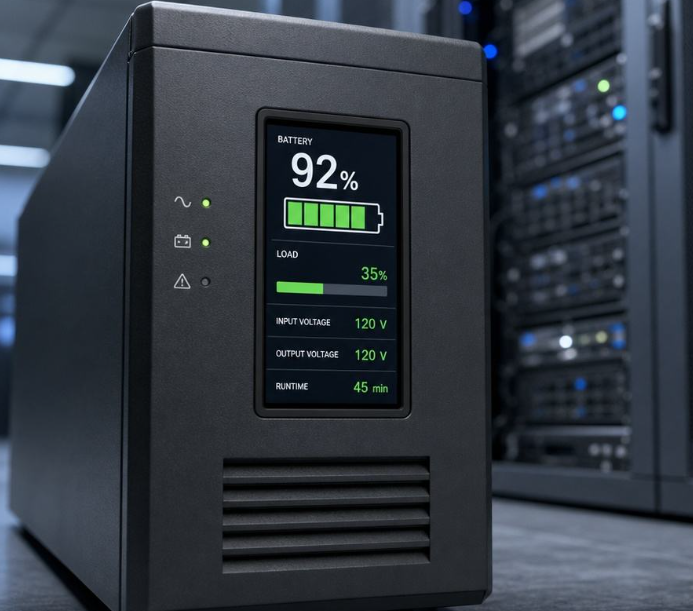
Mechanical Constraints in 1U/2U/4U Equipment
Rack height significantly affects the available display installation space.
A standard rack unit is 44.45 mm (1.75 inches) high.
Therefore:
- 1U equipment has a nominal height of 44.45 mm.
- 2U equipment has a nominal height of 88.9 mm.
- 4U equipment has a nominal height of 177.8 mm.
The actual usable front-panel area is smaller because of chassis walls, mounting hardware, ventilation openings, and other components.
A display’s diagonal size alone does not determine whether it will fit.
For example, a 3.5-inch display with a landscape orientation may have a different mechanical footprint from a portrait-oriented module with the same diagonal size.
Техническая рекомендация: Always evaluate the complete module outline drawing, active area, FPC exit position, connector dimensions, and mounting requirements before selecting a display for a rack-mounted enclosure.
4. Character LCD vs. TFT LCD vs. OLED: Which Technology Is Best?
Not every server or network device requires a full-color TFT display.
Different display technologies provide different advantages.
Character LCD for Basic Status Information
Character LCDs are suitable for simple text-based interfaces.
They can display equipment identification, operating status, IP addresses, or error codes.
Преимущества:
- Simple interface design
- Relatively low system complexity
- Suitable for text-based information
- Potentially economical integration
Character LCDs may be appropriate for equipment that does not require detailed graphical menus.
TFT LCD for Graphical Management Interfaces
TFT LCD technology supports more flexible graphical user interfaces.
It allows designers to display icons, multiple information fields, color-coded warnings, and interactive menus.
Преимущества:
- Flexible interface design
- Multiple resolution options
- IPS viewing-angle configurations
- Support for graphical diagnostics
- Available touch integration
For server and network equipment with more complex maintenance interfaces, TFT LCD is often a practical choice.
OLED for High-Contrast Status Displays
OLED displays offer excellent contrast and thin module structures.
They can be attractive for compact products requiring bright text against dark backgrounds.
However, continuously displaying fixed graphics may cause uneven OLED pixel aging.
For equipment operating 24 hours a day with persistent status icons, the risk of permanent image retention should be evaluated.
Display Technology Comparison
| Factor | Character LCD | TFT-ЖК-дисплей | OLED |
|---|---|---|---|
| Text display | Excellent for simple content | Yes | Yes |
| Graphical interface | Ограниченный | Strong | Strong |
| Color options | Ограниченный | Broad | Depends on module |
| Compact design | Yes | Yes | Yes |
| Static information | Хорошо подходит | Generally well suited | Requires aging assessment |
| Interface complexity | Usually lower | Depends on controller | Depends on controller |
| Typical application | Basic status panel | Graphical front-panel HMI | Compact high-contrast interface |
For network equipment requiring continuous graphical status display, industrial TFT LCD technology often provides a balanced solution in terms of flexibility, cost, and lifecycle considerations.
5. LCD Interface Selection: SPI, RGB, LVDS, MIPI and UART
Interface compatibility is a critical factor in OEM display development.
The selected LCD must communicate correctly with the main processor, embedded controller, or dedicated display control board.
SPI and MCU Interfaces for Small Displays
SPI-based display modules are commonly used in compact embedded systems.
They are suitable for basic graphical interfaces and relatively small display resolutions.
К преимуществам относятся:
- Limited signal connections
- MCU compatibility
- Compact PCB integration
- Suitable for simple status displays
However, available bandwidth may limit full-screen refresh performance.
For equipment displaying primarily static information, this limitation may be acceptable.
RGB Interface for Embedded Graphical Displays
Parallel RGB interfaces transmit pixel information and synchronization signals between compatible controllers and display modules.
They can support graphical interfaces without requiring a separate video conversion system.
However, multiple signal lines increase routing requirements.
For compact server controllers, connector layout and PCB design should be considered early.
Интерфейс LVDS
LVDS uses differential signaling and is employed in various industrial display architectures.
It can be useful for compatible medium-sized LCD modules and applications requiring controlled signal transmission.
Integration considerations include:
- Host interface compatibility
- Cable length
- Маршрутизация дифференциальных пар
- Connector selection
- Signal integrity
Интерфейс MIPI DSI
MIPI Display Serial Interface is commonly used in compact embedded systems.
It supports high-speed display data transmission through a relatively small number of signal connections.
MIPI DSI may be suitable when the host processor already provides a compatible display interface.
However, high-speed routing and initialization requirements must be addressed.
UART Smart Display Modules
For OEMs developing equipment with limited host graphics resources, a UART-based smart display can provide an alternative approach.
Unlike a basic TFT LCD panel, a smart display typically incorporates a controller and supporting firmware.
The host processor can send commands or status data to the display rather than continuously generating the complete graphical output.
Potential applications include:
- System status screens
- Alarm menus
- Network parameter displays
- Maintenance interfaces
Smart displays may simplify development when the selected platform supports the required GUI functions.
RS232, RS485 and CAN-Based Display Systems
RS232, RS485, and CAN are communication interfaces rather than native pixel interfaces for standard TFT LCD panels.
They may be used by intelligent HMI systems equipped with suitable controller electronics and firmware.
For server and network equipment, the final architecture should be selected according to the host system and required communication protocol.
LCD Interface Comparison
| Интерфейс | Suitable Application | Primary Consideration |
|---|---|---|
| SPI | Small TFT LCD modules | Host compatibility and bandwidth |
| MCU parallel | Compact embedded LCD systems | Bus width and controller support |
| RGB | Graphical embedded displays | Routing and signal count |
| LVDS | Compatible industrial LCD modules | Differential signal integrity |
| MIPI DSI | Современные встроенные процессоры | High-speed interface design |
| UART | Интеллектуальные дисплейные модули | Command protocol and GUI platform |
| RS232 / RS485 | HMI на базе контроллера | Additional electronics and protocol |
| CAN | Intelligent industrial HMI | Communication architecture |
6. Integrating an LCD Display with a Server BMC or Embedded Controller
Many modern servers use a Baseboard Management Controller (BMC) to monitor hardware status and support out-of-band management.
A BMC may collect information from sensors and other system components.
Depending on the server architecture, available information can include:
- System temperature
- Fan status
- Power supply condition
- Hardware health
- Management network settings
- Fault information
An LCD front panel can present selected information from the BMC or another embedded management controller.
How a Typical LCD Integration Architecture Works
A simplified design may involve:
Sensors and Management Data → BMC / Embedded Controller → Display Interface Controller → LCD Module
The display controller may be integrated into the host processor, incorporated into a separate MCU, or provided by a smart display module.
For example, a small MCU could obtain approved status information from the BMC and update a compact LCD over SPI.
Alternatively, a smart display could receive formatted status data through UART.
The appropriate design depends on available hardware interfaces, firmware architecture, security requirements, and system power states.
Why Hardware Integration Support Matters
A display may meet the desired size and resolution specifications but still require additional engineering work.
Potential integration challenges include:
- Incompatible interface voltage levels
- Connector pin assignment differences
- Display initialization requirements
- Insufficient host memory or graphics performance
- Mechanical mounting conflicts
- Backlight power requirements
- Firmware compatibility
For OEM equipment manufacturers, choosing a display supplier that can support interface and mechanical customization helps address these issues during development.
7. EMI/EMC and Signal Integrity in High-Density Rack Equipment
Servers and network switches contain numerous high-speed electronic components.
These may include processors, memory modules, power converters, clock circuits, and high-speed network interfaces.
The resulting electromagnetic environment can affect display communication and touch operation if the system is not properly designed.
Common Sources of Electromagnetic Interference
Potential interference sources include:
- Импульсные источники питания
- High-speed digital interfaces
- High-frequency clock signals
- DC/DC converters
- Long or poorly routed internal cables
- Inadequate grounding structures
These disturbances may contribute to display flickering, communication errors, unstable touch operation, or controller resets.
Shielding and Grounding Considerations
Depending on the application, engineers may evaluate:
- Metal shielding structures
- Conductive coatings
- Grounded display frames
- Shielded interconnects
- Подходящие пути обратной передачи сигнала
- Power supply filtering
Transparent conductive layers, including ITO shielding, may be appropriate for certain display assemblies.
However, shielding effectiveness depends on the complete electrical and mechanical design.
FPC and Connector Design
FPC routing can influence display signal reliability.
For compact rack-mounted equipment, the display module may be connected to a controller board through a relatively short flexible cable.
Key considerations include:
- Signal integrity
- Ground reference continuity
- Cable routing near noise sources
- Connector retention
- Mechanical bending requirements
- Interface timing and impedance
Customizing the FPC layout and connector position can help improve mechanical compatibility and simplify assembly.
EMC and ESD Validation
Front-panel electronics may be exposed to electrostatic discharge during equipment maintenance.
Therefore, ESD protection should be evaluated alongside electromagnetic emissions and immunity.
Relevant testing may include methods described in the IEC 61000-4 series, depending on the applicable equipment requirements.
EMC compliance must be evaluated at the complete equipment level. A shielded LCD module alone does not guarantee that the finished server or network device will meet regulatory requirements.
8. Power Consumption, Thermal Design and 24/7 Reliability
Server and network equipment may operate continuously for years.
For LCD front-panel design, long-term reliability is therefore an important consideration.
Low-Power LCD Design
A compact LCD may consume relatively little power compared with the complete server system.
However, efficient design is still valuable, particularly for equipment with standby power requirements.
Potential strategies include:
- Adjustable backlight brightness
- Automatic screen dimming
- Backlight shutdown during inactivity
- Low-power display controllers
- Event-driven screen updates
For interfaces that do not require continuous viewing, reducing backlight operating time may help extend backlight service life.
Backlight Lifetime
Most conventional TFT LCD modules use LED backlighting.
Over time, LED brightness can decrease due to aging.
The rate of degradation depends on operating current, temperature, LED design, and operating conditions.
For continuous-operation equipment, manufacturers should review the selected module’s backlight lifetime specifications.
Backlight lifetime values are often defined according to a specified percentage of initial brightness, rather than complete failure.
Thermal Management Inside Rack Equipment
High-density servers generate significant heat.
Although equipment cooling systems manage overall thermal conditions, local hotspots can still affect nearby components.
Display designers should consider:
- Internal chassis temperature
- Airflow direction
- Distance from heat-generating components
- LCD module operating temperature
- Backlight thermal behavior
- Adhesive and polarizer durability
A display installed near a high-temperature area may experience accelerated aging.
Static Image and Display Aging
Server front panels may display the same IP address, icon, or system status for long periods.
TFT LCD displays can experience image sticking under certain conditions, while OLED displays may be susceptible to permanent differential pixel aging.
For continuously operating status interfaces, engineers should evaluate display technology and duty cycle together.
For long-term server applications, reliability should be assessed using representative operating conditions rather than relying only on nominal display specifications.
9. Why 5–10 Year LCD Supply Stability Matters for Server OEMs
Industrial servers and network equipment are often designed for extended product lifecycles.
Even when the main hardware platform changes, manufacturers may want to maintain compatible display modules across several product generations.
This makes long-term LCD availability an important procurement consideration.
The Cost of Unexpected LCD Discontinuation
A display module reaching end-of-life can create more problems than simply finding another screen with the same diagonal size.
Replacing a discontinued LCD may require changes to:
- PCB connectors
- FPC geometry
- Pin assignments
- Interface timing
- Display drivers
- Backlight circuitry
- Mechanical mounting
- Firmware initialization
Even small changes can require engineering validation and production updates.
For server and network equipment manufacturers, unexpected component discontinuation may also affect after-sales service and spare parts availability.
Why Long-Lifecycle Display Supply Is Important
A suitable industrial display supplier should support lifecycle planning from the early stages of product development.
Important considerations include:
Component Availability
Evaluate the long-term availability of LCD panels, driver ICs, backlights, and connector components.
Product Change Notification
Establish procedures for notifying customers when important component or manufacturing changes occur.
End-of-Life Management
Define how product discontinuation will be communicated and whether last-time-buy arrangements are possible.
Replacement Compatibility
Evaluate alternative displays that can maintain mechanical, electrical, and software compatibility.
Spare Parts Planning
Coordinate expected maintenance demand with long-term supply requirements.
QIHAN’s 5–10 Year Supply Planning for OEM Projects
QIHAN supports industrial display programs requiring 5–10 year supply planning, helping OEM manufacturers address long-term product availability and replacement requirements.
For server and network equipment manufacturers, this can provide several advantages:
- Reduced risk of unnecessary display redesign
- Improved continuity across production batches
- More predictable component sourcing
- Better planning for maintenance and spare parts
- Greater flexibility in long-term OEM manufacturing programs
Specific supply commitments should be established according to the selected display model, component availability, purchase forecasts, and agreed project conditions.
What OEM Buyers Should Confirm
Before approving a long-lifecycle display project, procurement teams should clarify:
- Expected production and service period
- Annual order volume
- Forecast accuracy and purchasing arrangements
- Component change notification procedures
- Compatible replacement options
- Spare parts and end-of-life planning
A documented lifecycle plan helps both the display manufacturer and equipment OEM manage long-term supply risks.
10. Custom LCD Modules for Rack-Mount Servers and Network Equipment: Why Choose QIHAN?
Choosing a standard LCD module may be sufficient for early prototyping.
However, production equipment often requires adjustments to match enclosure dimensions, controller interfaces, and operating conditions.
QIHAN is a manufacturer of small and medium-sized industrial TFT LCD, OLED, LCD, and touchscreen display modules, providing OEM/ODM customization services for embedded equipment manufacturers.
QIHAN supports projects from initial requirements evaluation to prototype development and mass production.
Custom Display Sizes and Mechanical Integration
For rack-mounted equipment, physical integration can be challenging.
QIHAN can evaluate customization requirements involving:
- Display module dimensions
- Active display area
- Module outline
- Mounting structures
- FPC exit direction
- Connector position
- Cover glass dimensions
For 1U and 2U equipment, mechanical optimization can be particularly valuable.
Flexible Interface and Driver Board Customization
Different server and network equipment platforms use different embedded processors and control architectures.
QIHAN supports display interface customization and integration solutions according to project requirements.
Potential options include:
- SPI and MCU interfaces
- RGB
- LVDS
- MIPI DSI
- Compatible driver board solutions
- UART smart display architectures
Interface availability depends on the selected LCD module and supporting electronics.
Hardware Integration and Engineering Support
QIHAN’s OEM/ODM services extend beyond the LCD panel itself.
Project support can include:
- Настройка FPC
- Connector and pinout adjustment
- Driver board development
- Display interface evaluation
- Touchscreen integration
- Mechanical compatibility assessment
- Firmware and system integration discussions
For OEM manufacturers, early engineering collaboration can help reduce the risk of selecting a display that requires extensive downstream redesign.
Industrial Reliability and Quality Validation
Display modules intended for server and network equipment should be evaluated for operating temperature, long-term stability, and electrical compatibility.
Depending on project requirements, relevant validation may include:
- Display functionality testing
- Brightness and backlight testing
- Temperature testing
- Aging evaluation
- Interface compatibility testing
- Mechanical and vibration testing
- ESD and system integration assessment
The specific tests and acceptance criteria should be agreed upon for each project.
5–10 Year Long-Term Supply Support
Long-term display sourcing is one of QIHAN’s key advantages for industrial OEM programs.
For server and network equipment manufacturers planning multi-year production, QIHAN can support display lifecycle discussions, sourcing arrangements, and compatible module planning.
This approach can help OEM customers reduce lifecycle uncertainty while maintaining greater control over product design and manufacturing schedules.
11. Engineering Checklist for Custom Server LCD Displays
Before requesting a custom LCD quotation, equipment manufacturers should prepare the main technical requirements.
| Параметр | Information Required |
|---|---|
| Equipment type | Server, switch, router, firewall or rack controller |
| Rack configuration | 1U, 2U, 4U or custom enclosure |
| Размер дисплея | 2.4″, 2.8″, 3.5″, 4.3″, 5″, 5.6″ or custom |
| Display type | Character LCD, TFT LCD, IPS TFT or OLED |
| Резолюция | Required text and graphical detail |
| Интерфейс | SPI, MCU, RGB, LVDS, MIPI or smart display |
| Host controller | MCU, embedded processor, BMC or controller board |
| Mechanical design | Module dimensions, FPC, connector and mounting |
| Яркость | Indoor visibility and backlight requirements |
| Функция сенсорного управления | Non-touch, capacitive or resistive |
| Power requirements | Supply voltage and power budget |
| Рабочая температура | Expected chassis operating conditions |
| EMC requirements | Applicable equipment-level criteria |
| Supply lifecycle | Target production and service period |
| Order quantity | Prototype demand and annual forecast |
Sharing a module drawing, enclosure design, or existing LCD specification can help the display supplier evaluate compatibility more accurately.
12. Frequently Asked Questions (FAQ)
1. What size LCD is best for a 1U rack server?
Small character LCDs and compact graphic displays are often suitable for 1U server front panels.
A 2.4-inch or similarly compact TFT LCD may be considered, depending on its actual outline dimensions and orientation.
The display must fit within the usable front-panel area while accommodating ventilation, buttons, mounting features, and other components.
2. Do all rack-mount servers require an LCD front panel?
No. Many rack-mounted servers use LEDs, remote BMC management, and software interfaces without an integrated LCD.
LCD front panels are an optional design feature for equipment requiring local status information or maintenance functions.
3. What is the difference between a character LCD and a TFT LCD for network equipment?
Character LCDs are well suited to simple text information and basic menu systems.
TFT LCDs support more flexible graphical interfaces, including icons, multiple status fields, color-coded alarms, and advanced menus.
The appropriate choice depends on interface complexity and system requirements.
4. Which LCD interface is best for a server BMC?
There is no universal interface for all BMC architectures.
The choice depends on available host interfaces, firmware resources, display resolution, and system design.
A compact display may use SPI through an embedded controller, while more advanced graphical systems may use RGB, LVDS, MIPI, or a dedicated smart display controller.
5. How can EMI affect an industrial LCD in network equipment?
Electromagnetic interference can contribute to display flickering, signal errors, touchscreen instability, and controller communication problems.
Appropriate grounding, shielding, cable routing, power filtering, and system-level EMC validation help manage these risks.
6. Is TFT LCD or OLED better for an always-on server status display?
TFT LCD is often a practical option for continuously displaying relatively static information.
OLED offers excellent contrast and thin construction, but persistent static graphics can lead to uneven pixel aging and permanent burn-in.
Both technologies should be evaluated according to operating temperature, duty cycle, power consumption, and expected service life.
7. How long can industrial LCD modules remain available for OEM production?
Availability varies by manufacturer, display model, component platform, and purchasing arrangements.
QIHAN supports industrial OEM projects targeting 5–10 year supply planning, with project-specific terms established according to component availability and agreed requirements.
8. Can QIHAN customize 2.4–5.6 inch LCD modules for servers and network switches?
Yes. QIHAN provides OEM/ODM display customization services covering size selection, interfaces, FPC design, connectors, brightness, touch integration, and mechanical requirements.
The engineering team can evaluate suitable module configurations based on the customer’s project specifications.
9. Can QIHAN provide UART smart display modules?
QIHAN supports smart display and embedded HMI solutions.
UART-based architectures can be evaluated for projects requiring command-driven graphical interfaces.
A smart display includes additional controller functionality and should not be confused with a bare TFT LCD panel.
10. How can OEM manufacturers reduce the risk of LCD end-of-life?
Manufacturers should select suppliers with documented lifecycle planning, establish product change notification procedures, and evaluate replacement compatibility early.
Forecasting, spare parts planning, and clear sourcing arrangements can reduce the risk of unexpected redesigns.
Conclusion: Choose a Reliable LCD Partner for Your Server and Network Equipment
Selecting an LCD display for rack-mounted servers, network switches, routers, and related equipment requires a careful balance between functionality, integration complexity, reliability, and long-term sourcing.
A compact 2.4-inch display may be sufficient for basic status information, while 3.5-inch to 5.6-inch TFT LCD modules can support more advanced graphical interfaces.
For OEM manufacturers, the most important considerations often include:
- Mechanical compatibility with rack-mounted enclosures
- Display interface and controller integration
- EMI/EMC and signal integrity
- Low-power and thermal performance
- Long-term component availability
QIHAN helps server and network equipment OEMs develop customized industrial LCD solutions through flexible module design, hardware integration support, and 5–10 year supply planning.
By considering these requirements early in the development process, manufacturers can create practical display interfaces while reducing integration and sourcing risks.
Looking for a Custom LCD Display for Your Server or Network Equipment?
QIHAN — Your OEM/ODM Partner for Small and Medium-Sized Industrial LCD Displays
Whether you are developing a 1U rack server, network switch, router, firewall, or intelligent monitoring controller, QIHAN can help evaluate a display solution suited to your application.
Our OEM/ODM capabilities include:
- Custom 2.4–5.6 inch industrial LCD and TFT modules
- Display size, resolution and mechanical customization
- SPI, RGB, LVDS, MIPI and compatible interface solutions
- Custom FPC, connectors and driver boards
- Touchscreen and smart display integration
- EMI/EMC integration considerations
- Long-term 5–10 year supply planning
Send us your display requirements, host interface, mechanical drawings and estimated annual order quantity for a customized solution.
Веб-сайт: https://qihantech.com/
Электронная почта: sales@shanghaiqihan.com
Contact QIHAN today to request a custom LCD display quotation for your OEM project.
 English
 Português
 Français
 Deutsch
 Español
 Русский